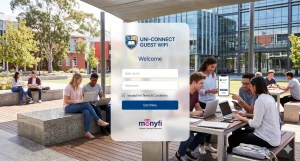
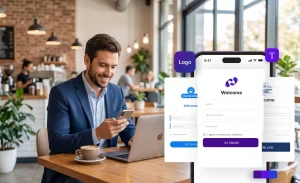
In today’s connected world, providing free Wi-Fi isn’t just a perk—it’s an expectation. But what if your guest Wi-Fi could do more than connect devices? Enter branded welcome portals for Wi-Fi, also known as splash pages. These are the customizable landing pages guests see before accessing your network, turning a simple login into an opportunity to showcase your brand and engage users right from the start.
Imagine a hotel guest logging in and being greeted with a personalized welcome message featuring your logo, special offers, and easy social media integration. This isn’t just about connectivity; it’s about creating memorable experiences. With the right guest Wi-Fi solutions like Monyfi, businesses in hospitality and retail can elevate their networks into powerful marketing tools.

The Benefits of Branded Welcome Portals
Branded welcome portals for Wi-Fi go beyond basic access. They reinforce your brand identity every time someone connects. For instance, displaying your colors, logos, and taglines helps build familiarity and trust, making your business stand out in a crowded market.
These portals also open doors for promotions. You can highlight daily specials, upcoming events, or loyalty programs directly on the splash page. This targeted approach turns passive Wi-Fi users into active customers, boosting foot traffic and sales without extra effort.
On the data side, guest Wi-Fi solutions with branded portals allow seamless collection of valuable insights. Through opt-in forms, you can gather emails, preferences, or feedback. This data fuels personalized marketing campaigns, helping you understand your audience better and refine your offerings.

Step-by-Step Guide to Creating a Splash Page with Monyfi
A splash page is an essential part of any Guest Wi-Fi solution — it’s the first thing your customers see when they connect to your network.
Watch the short video below to see how Monyfi empowers businesses to create branded Wi-Fi welcome portals that not only reflect your brand identity but also engage customers from the moment they connect:
With Monyfi, creating and managing your own branded splash page is quick and easy. Let’s walk through the process step by step.
1. Log In to the Monyfi Web Portal
Start by logging in to your Monyfi account. Once you’re signed in, you’ll see the dashboard, where you can access all your Wi-Fi management tools.
2. Go to the Guest Wi-Fi Section
On the left-hand menu, click the Guest Wi-Fi tab. This is where you can create and manage splash pages for your guests’ Wi-Fi access.
3. Create a New Splash Page
Click the Create Splash Page button to begin. You’ll now be asked to select your registration type — Monyfi offers four options:
- Click and Connect: Instant access with a single click.
- Data Collection: Gather names, emails, or other details before granting access.
- Passcode Authentication: Require a passcode for login.
- Voucher: Provide unique vouchers for controlled access.
Choose the option that best fits your Guest Wi-Fi solution and your business needs.
4. Name Your Splash Page
Give your splash page a clear name, such as Lobby Wi-Fi or Conference Room Access, so you can easily identify it later.
5. Set the Browser Heading and Redirect Option
Enter a browser heading — this is the title that appears at the top of your guests’ browser window.
Next, choose where your guests will be redirected after connecting:
- Thank You Page – shows a simple thank-you message.
- Custom URL – redirects users to any webpage you prefer (by default, it’s set to google.com).
6. Customize the Design
For a branded experience, click Customize Template. You can change your splash page’s logo, colors, fonts, and other design elements to match your business style. This step makes your Guest Wi-Fi portal look polished and professional.
7. Save and Activate Your Splash Page
Once you’re happy with your setup, click Save. Then, tick the Activate box to bring your splash page live. Your guests can now access your Wi-Fi through your new branded portal.
8. Edit or Manage Existing Pages
If you ever need to make updates, go to Manage Splash Page. Find the one you want to change, click Edit, and adjust the settings — it’s that simple.
With these steps, you’ll have a polished branded welcome portal up and running quickly. Monyfi’s features streamline the process, making advanced guest Wi-Fi solutions accessible to any business owner.

Real-World Examples of Branded Welcome Portals in Action
Let’s see how branded welcome portals for Wi-Fi work in practice. In the hospitality sector, a boutique hotel uses Monyfi’s system to greet loyalty members by name upon login. The splash page displays room upgrades or spa discounts, based on past visits. This personalization has increased repeat bookings by 25%, turning Wi-Fi into a loyalty booster.
Retail stores benefit too. Imagine a coffee shop chain where the welcome portal offers a free drink coupon for email sign-ups. Using Monyfi’s analytics, they track peak hours and push time-sensitive promotions, like afternoon deals to combat slow periods. One retailer reported a 15% sales uplift from these targeted efforts.
In a mall setting, branded portals collect shopper preferences to deliver tailored ads. For example, a fashion store integrates surveys asking about style interests, then follows up with email campaigns. These guest Wi-Fi solutions not only enhance the shopping experience but also provide actionable data for inventory planning.
Hypothetically, a beach resort could use Monyfi to show weather updates and activity suggestions on the portal. Guests opting in for notifications receive exclusive event invites, fostering community and encouraging longer stays. These examples show how versatile branded welcome portals can be across industries.

Best Practices for Incorporating Surveys on Welcome Portals
Surveys on branded welcome portals for Wi-Fi can yield goldmines of feedback, but only if done right. Keep them short—aim for 3-5 questions max—to avoid frustrating users. Focus on quick, multiple-choice formats that load fast on mobiles.
Make surveys mobile-friendly from the start. Monyfi’s responsive designs ensure they look great on any screen, boosting completion rates. Test on various devices to catch any glitches early.
Compliance is key. Always adhere to privacy laws like GDPR by making opt-ins voluntary and transparent. Explain how data will be used, and provide easy ways to unsubscribe. This builds trust and encourages honest responses.
To maximize engagement, tie surveys to incentives. Offer a small discount or entry into a draw for completing one. Position them post-login to not block access, ensuring a smooth guest Wi-Fi experience.
Finally, analyze results promptly. Monyfi’s tracking tools let you spot trends, like common complaints, and act on them. Regularly update surveys to keep them relevant, turning your guest Wi-Fi solutions into ongoing improvement engines.
Conclusion
Branded welcome portals transform standard guest Wi-Fi into engaging, revenue-driving assets. By leveraging Monyfi’s robust Wi-Fi management system, businesses can create customized experiences that reinforce branding, collect valuable data, and boost customer loyalty. Whether you’re in hospitality or retail, these portals elevate your guest Wi-Fi solutions to new heights.
Ready to see it in action? Check out our demo video to explore how easy it is to get started with Monyfi.
FAQ
What is a branded welcome portal for Wi-Fi?
A branded welcome portal, also known as a splash page, is a customizable landing page that guests see before accessing your Wi-Fi network. It allows businesses to showcase their logo, colors, promotions, and other brand elements, turning a simple login into an engaging marketing opportunity.
Why should businesses use branded welcome portals?
These portals reinforce brand identity, promote special offers, and collect valuable customer data through opt-in forms. They can boost sales, increase customer loyalty, and provide insights into user preferences, making your guest Wi-Fi a powerful tool rather than just a connectivity service.
Do I need technical expertise to create a branded welcome portal with Monyfi?
No coding expertise is required. Monyfi’s cloud-based platform offers a user-friendly dashboard with drag-and-drop tools, ready-made templates, and intuitive customization options, making it accessible for any business owner.
How does Monyfi help with data collection and analytics?
Monyfi allows you to add opt-in forms for emails, preferences, or feedback while ensuring compliance with privacy laws. Its analytics module tracks metrics like login times, device types, and engagement rates, helping you refine marketing strategies and improve offerings.
Can I integrate promotions and social media into the portal?
Yes, you can embed targeted promotions, schedule campaigns, and integrate social logins like Facebook or Google for seamless access. This personalization can be based on user data for a more tailored experience.
What industries benefit most from Monyfi’s guest Wi-Fi solutions?
Monyfi is ideal for hospitality (e.g., hotels, resorts) and retail (e.g., coffee shops, malls), but its versatility makes it suitable for any business offering public Wi-Fi, such as event venues or offices.
How do I ensure my portal is mobile-friendly?
Monyfi’s designs are responsive by default, ensuring they work well on all devices. Always preview and test your portal on various screens before deployment to confirm optimal performance.
What are best practices for adding surveys to the welcome portal?
Keep surveys short (3-5 questions), use multiple-choice formats, and make them voluntary with clear opt-in options for privacy compliance. Offer incentives like discounts to boost completion rates, and position them after login to avoid disrupting access.
How can I get started with Monyfi?
Sign up for an account on Monyfi’s platform, access the dashboard, and use the Customizable Captive Portal Module. Follow the step-by-step guide to customize, test, and deploy your portal. For a visual overview, check out the demo video.
Is there any downtime when updating the portal?
No, Monyfi’s cloud-based system allows real-time updates without interrupting your network.